Table of Contents
Cisco : Dynamic NAT
NAT dinamis adalah tipe NAT di mana sekelompok alamat IP privat dalam jaringan internal dipetakan ke sekelompok alamat IP publik secara dinamis. Tidak seperti NAT statis yang memetakan satu alamat IP privat ke satu alamat IP publik secara tetap, NAT dinamis memungkinkan banyak perangkat di jaringan internal berbagi sekelompok alamat IP publik secara bergantian.
Syntax
Untuk konfigurasi NAT dynamic pertama anda harus membuat pool untuk ip yang akan terlihat oleh internet (public ip). dan anda harus membuat access list yang sama dengan pool ip private anda.
Definisikan pool
ip nat pool [pool name] x.x.x.x - y.y.y.y netmask [subnetmask]
- x.x.x.x - y.y.y.y : range ip address public
Membuat access list untuk jaringan internal
access-list [acl_number] permit X.X.X.X [wildcard mask]
X.X.X.X : Network Ip Prival (LAN)
Konfigurasi NAT Dynamic
ip nat inside source list [acl_number] pool [pool_name]
Masih sama dengan NAT static anda harus menentukan interface inside dan outsite terlebih dahulu dengan:
interface [interface]
  ip nat inside
interface [interface]
  ip nat outside
Topologi
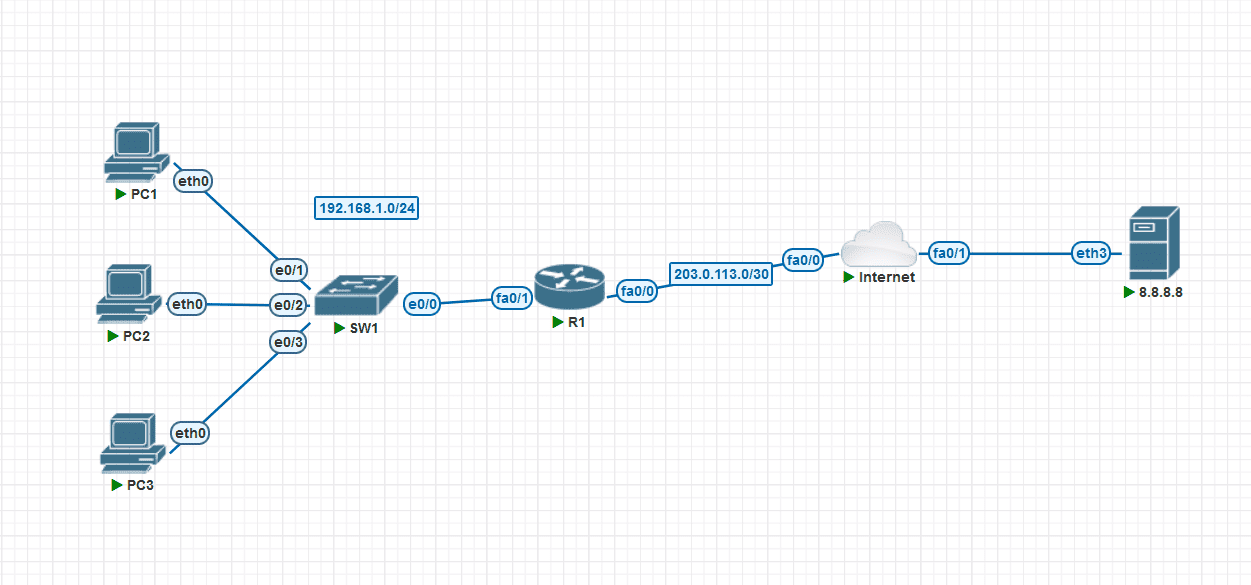 Tujuan: Kita mempunyai pool ip public 100.0.0.0/24 Gunakan pool tersebut untuk menkonfigurasi NAT dynamic dengan Mapping IP addresses dari IP LAN 192.168.1.X, PC1, PC2, dan PC3 ke 100.0.0.x/24
Konfigurasi
- R1: Tentukan Interface inside dan outsite
R1(config)#interface fastEthernet 0/0
R1(config-if)#ip nat outside
R1(config)#interface fastEthernet 0/1
R1(config-if)#ip nat inside
- R1 : Membuat Pool Untuk IP Public
R1(config)#ip nat pool POOL1 100.0.0.1 100.0.0.3 netmask 255.255.255.01
- R1 : Membuat ACL untuk range ip internal
R1(config)#access-list 1 permit 192.168.1.0 0.0.0.255
- R1 : Mempetakan ip pool yang telah dibuat ke ip private dgn dynamic nat
R1(config)#ip nat inside source list 1 pool POOL1
Testing
* PC1 : Test ping dan hasil capture
PC1> ip dhcp
DORA IP 192.168.1.1/24 GW 192.168.1.254

PC1> ping 8.8.8.8 -c 1

84 bytes from 8.8.8.8 icmp_seq=1 ttl=62 time=48.818 ms

PC1> ping google.com
google.com resolved to 142.251.175.113

84 bytes from 142.251.175.113 icmp_seq=1 ttl=254 time=19.530 ms
84 bytes from 142.251.175.113 icmp_seq=2 ttl=254 time=26.425 ms
84 bytes from 142.251.175.113 icmp_seq=3 ttl=254 time=14.858 ms
84 bytes from 142.251.175.113 icmp_seq=4 ttl=254 time=15.780 ms
84 bytes from 142.251.175.113 icmp_seq=5 ttl=254 time=11.737 ms

* PC2 : Test ping dan hasil capture
PC2> ip dhcp
DORA IP 192.168.1.2/24 GW 192.168.1.254

PC2> ping 8.8.8.8 -c 1

84 bytes from 8.8.8.8 icmp_seq=1 ttl=62 time=29.733 ms

PC2> ping google.com -c 1
google.com resolved to 142.251.175.113

84 bytes from 142.251.175.113 icmp_seq=1 ttl=254 time=20.108 ms

* PC3 : Test ping dan hasil capture
PC3> ip dhcp
DORA IP 192.168.1.3/24 GW 192.168.1.254

PC3> ping 8.8.8.8 -c 1

84 bytes from 8.8.8.8 icmp_seq=1 ttl=62 time=26.725 ms

PC3> ping google.com -c 1
google.com resolved to 142.251.175.113

84 bytes from 142.251.175.113 icmp_seq=1 ttl=254 time=19.783 ms

* R1 : logs nat translations
R1#show ip nat translations
Pro Inside global      Inside local       Outside local      Outside global
udp 100.0.0.1:9033     192.168.1.1:9033   8.8.8.8:53         8.8.8.8:53
icmp 100.0.0.1:32494   192.168.1.1:32494  142.251.175.113:32494 142.251.175.113:32494
icmp 100.0.0.1:32750   192.168.1.1:32750  142.251.175.113:32750 142.251.175.113:32750
icmp 100.0.0.1:33006   192.168.1.1:33006  142.251.175.113:33006 142.251.175.113:33006
icmp 100.0.0.1:33262   192.168.1.1:33262  142.251.175.113:33262 142.251.175.113:33262
icmp 100.0.0.1:33518   192.168.1.1:33518  142.251.175.113:33518 142.251.175.113:33518
--- 100.0.0.1          192.168.1.1        ---                ---
--- 100.0.0.3          192.168.1.2        ---                ---
udp 100.0.0.2:36935    192.168.1.3:36935  8.8.8.8:53         8.8.8.8:53
icmp 100.0.0.2:46574   192.168.1.3:46574  142.251.175.113:46574 142.251.175.113:46574
--- 100.0.0.2          192.168.1.3        ---                ---