Cisco : EtherChannel
Apa itu Ether Cheanel? EtherChannel adalah fitur pada perangkat jaringan Cisco yang memungkinkan Anda menggabungkan beberapa link fisik Ethernet menjadi satu link logika tunggal. Biasanya ini digunakan dalam interface trunk (switch antar switch) yang digunakan untuk meningkatkan bandwidth atau Redundansi
Syntax
Dalam konfigurasi EtherChannel, terdapat tiga cara untuk mengkonfigurasi protokolnya dengan agregasi link menggunakan PAgP (Port Aggregation Protocol) yang merupakan protokol proprietary Cisco atau menggunakan LACP protokol standar (IEEE 802.3ad). atau juga kita dapat menkonfigurasi secara manual Static.
Berikut adalah syntax dalam konfigurasi ether channel.
interface range <interfaces range>
  switchport mode trunk
  channel-group <number> mode <protocol>
Keterangan
- Interface range : Interface interface yang akan di buddle
- number : identifier id
- protocol : protocol yang digunakan dalam ether channel
Tergantung dengan mode apa yang digunakan dalam kedua link yang dapat memutuskan link terbentuk ether channel atau tidak. Berikut adalah gambar yang menunjukan bagaimana perangkat cisco bernegosiasi untuk memutuskan protokol mana yang akan digunakan.

Contoh
Switch#interface range FastEthernet0/1 - 2
Switch(config-ifrange)#switchport mode trunk
Switch(config-ifrange)#channel-group 1 mode desirable
Troubleshoot EtherChannel
show etherchannel summary
show etherchannel port-channel <port-channel number>
Topologi
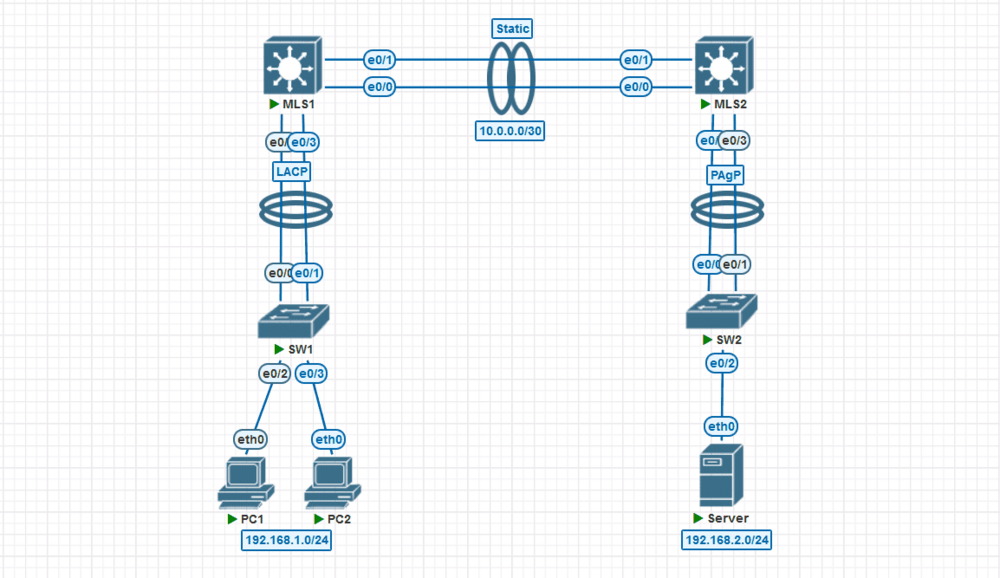
Preconfigure
- MLS1
hostname MLS1
!
ip dhcp excluded-address 192.168.1.1
!
ip dhcp pool LAN1
 network 192.168.1.0 255.255.255.0
 default-router 192.168.1.1
!
!
interface Vlan1
 ip address 192.168.1.1 255.255.255.0
 no shutdown
!
* MLS2
hostname MLS2
!
ip dhcp excluded-address 192.168.2.1
!
ip dhcp pool LAN2
 network 192.168.2.0 255.255.255.0
 default-router 192.168.2.1
!
!
interface Vlan1
 ip address 192.168.2.1 255.255.255.0
 no shutdown
!
Konfigurasi
Konfigurasi Etherchannel LACP antara SW1 dan MLS1
- SW1
SW1(config)#interface range ethernet 0/0 - 1
SW1(config-if-range)#switchport trunk encapsulation dot1q
SW1(config-if-range)#switchport mode trunk
SW1(config-if-range)#channel-group 1 mode active
- MLS1
MLS1(config)#interface range ethernet 0/2 - 3
MLS1(config-if-range)#switchport trunk encapsulation dot1q
MLS1(config-if-range)#switchport mode trunk
MLS1(config-if-range)#channel-group 1 mode active
MLS1(config-if-range)#exit
Konfigurasi Etherchannel PAgP antara SW2 dan MLS2
- SW2
SW2(config)#interface range ethernet 0/0 - 1
SW2(config-if-range)#channel-group 1 mode desirable
MLS2(config)#interface Port-Channel 1
MLS2(config-if)#switchport trunk encapsulation dot1q
MLS2(config-if)#switchport mode trunk
- MLS2
MLS2(config)#interface range ethernet 0/2-3
MLS2(config-if-range)#switchport trunk encapsulation dot1q
MLS2(config-if-range)#switchport mode trunk
MLS2(config-if-range)#channel-group 1 mode desirable
Konfigurasi Etherchannel Sttatic antara MLS1 dan MLS2
- MLS1
MLS1(config)#interface range ethernet 0/0 - 1
MLS1(config-if-range)#no switchport
MLS1(config-if-range)#channel-group 2 mode on
Creating a port-channel interface Port-channel 2
MLS1(config-if-range)#exit
MLS1(config)#interface Port-Channel 2
MLS1(config-if)#ip address 10.0.0.1 255.255.255.252
- MLS2
MLS2(config)#interface range ethernet 0/0 - 1
MLS2(config-if-range)#no switchport
MLS2(config-if-range)#channel-group 2 mode on
Creating a port-channel interface Port-channel 2
MLS2(config-if-range)#exit
MLS2(config)#interface port-channel 2
MLS2(config-if)#ip address 10.0.0.2 255.255.255.252
Mengatur static routing antar subnet jaringan
- MLS1
MLS1(config)#ip routing
MLS1(config)#ip route 192.168.2.0 255.255.255.0 10.0.0.2
- MLS2
MLS2(config)#ip routing
MLS2(config)#ip route 192.168.1.0 255.255.255.0 10.0.0.1
Testing
* MLS1
MLS1#show etherchannel summary
Flags:  D - down        P - bundled in port-channel
        I - stand-alone s - suspended
        H - Hot-standby (LACP only)
        R - Layer3      S - Layer2
        U - in use      N - not in use, no aggregation
        f - failed to allocate aggregator

        M - not in use, minimum links not met
        m - not in use, port not aggregated due to minimum links not met
        u - unsuitable for bundling
        w - waiting to be aggregated
        d - default port

        A - formed by Auto LAG


Number of channel-groups in use: 2
Number of aggregators:           2

Group  Port-channel  Protocol    Ports
------+-------------+-----------+-----------------------------------------------
1      Po1(SU)         LACP      Et0/2(P)    Et0/3(P)
2      Po2(RU)          -        Et0/0(P)    Et0/1(P)
* MLS2
MLS2#show etherchannel summary
Flags:  D - down        P - bundled in port-channel
        I - stand-alone s - suspended
        H - Hot-standby (LACP only)
        R - Layer3      S - Layer2
        U - in use      N - not in use, no aggregation
        f - failed to allocate aggregator

        M - not in use, minimum links not met
        m - not in use, port not aggregated due to minimum links not met
        u - unsuitable for bundling
        w - waiting to be aggregated
        d - default port

        A - formed by Auto LAG


Number of channel-groups in use: 2
Number of aggregators:           2

Group  Port-channel  Protocol    Ports
------+-------------+-----------+-----------------------------------------------
1      Po1(SU)         PAgP      Et0/2(P)    Et0/3(P)
2      Po2(RU)          -        Et0/0(P)    Et0/1(P)