This is an old revision of the document!
Cisco : Extended Access Control List
Pada Halaman sebelumnya Cisco : Standard Access Control List kita telah menkonfigurasi Acess Control list standard sekarang kita akan konfigurasi Extended Access control list. Berbeda dengan standard ACL ,extended ACL berkemampuan untuk menfilter paket tidak hanya dengan source ip address melainkan dengan sourceip, destination ip, Port, Type connection (tcp/udp). Sehingga memungkinkan filtering paket lebih tepat sasaran.
Syntax
Berikut adallah syntax dalam menkongfigurasi Extended ACL:
Membuat Extended ACL (number)
Router(config)# access-list [ACL_NUMBER] [permit|deny] protocol source source-wildcard destination destination-wildcard [eq port]
- ACL_NUMBER : 100-199, 2000-2699
- permit: Mengizinkan lalu lintas dari alamat IP yang ditentukan.
- deny: Menolak lalu lintas dari alamat IP yang ditentukan.
- source/destinantion: source/destination ip address yang ingin di filter.
- wildcard: wildcard untuk menentukan range network. w
- eq port : equal, port yang akan di filter. bisa berupa nama.
Contoh:
Router(config)# access-list 101 permit tcp 192.168.1.0 0.0.0.255 172.16.0.0 0.0.0.255 eq 80
Membuat Standard ACL (Named)
Router(config)# ip access-list extended [ACL_NAME]
Router(config-ext-nacl)# [permit|deny] protocol source source-wildcard destination destination-wildcard [eq port]
contoh:
Router(config)# ip access-list extended WEB_FILTER
Router(config-ext-nacl)# permit tcp 192.168.1.0 0.0.0.255 172.16.0.0 0.0.0.255 eq 80
Router(config-ext-nacl)# deny tcp any any eq 23
Terapkan ACL ke interface
Router(config)# interface <nama_interface>
Router(config-if)# access-list <nomor_acl>/<named_acl> in/out
- in: Menerapkan ACL pada paket yang kearah interface.
- out: Menerapkan ACL pada paket yang keluar dari interface.
Contoh:
Router(config)# interface FastEthernet0/0
Router(config-if)# access-list 10 in
Router(config)# interface GigabitEthernet 0/0
Router(config-if)# ip access-group WEB_FILTER in
Troubleshot
Router# show access-lists
Topologi
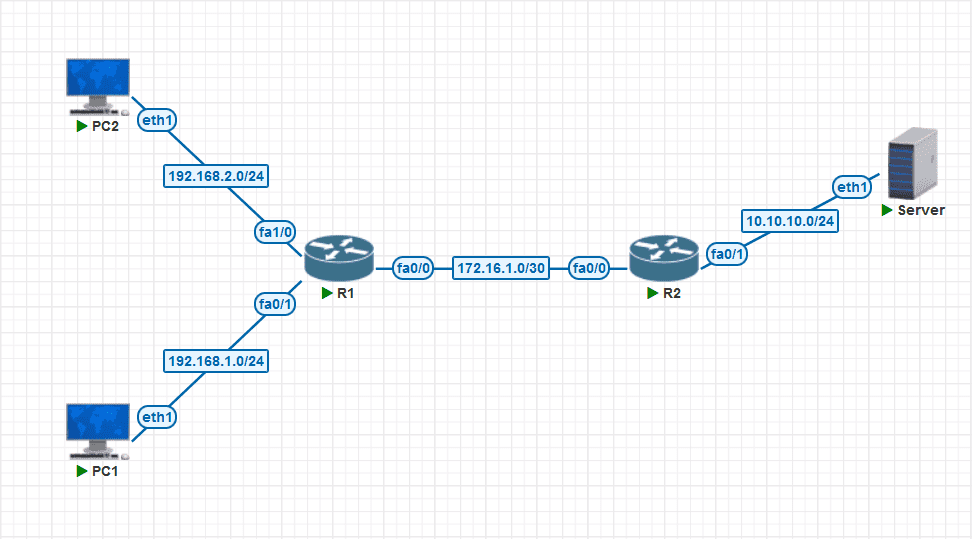 Tujuan:
- Block akses http pada LAN 1 ke Server
- Block akses ssh pada LAN 2 ke Server-C
Konfigurasi
Konfigurasi Standard ACL
Apabilsa standar ACL umumnya ditempatkan paling dekat dengan tujuan. Extended ACL lebih baik ditempatkan paling dekat dengan sumber.
Membuat extended ACL rules
block https access dari lan1
- Membuat access control liss
R1(config)#ip access-list extended Block-HTTP
R1(config-ext-nacl)#$192.168.1.0 0.0.0.255 10.10.10.0 0.0.0.255 eq 80
R1(config-ext-nacl)#  permit ip any any
- terapkan pada interface
R1(config)#interface fa0/1
R1(config-if)# ip access-group Block-HTTP in
block ssh access dari lan2
- Membuat access control list
R1(config)#ip access-list extended Block-SSH
R1(config-ext-nacl)#$192.168.2.0 0.0.0.255 10.10.10.0 0.0.0.255 eq 22
R1(config-ext-nacl)#  permit ip any any
- terapkan pada interface
R1(config)#interface fa1/0
R1(config-if)# ip access-group Block-SSH in