This is an old revision of the document!
Cisco Labs : Studi Kasus Desain Jaringan (BNSP)
PT. Jaya Net Persada memiliki 4 bagian, yaitu:
- Bagian Pemasaran
- Bagian SDM
- Bagian Teknik
- Bagian Keuangan
Direktur perusahaan ingin mengembangkan infrastruktur IT di perusahaannya. Perusahaan tersebut berkantor di sebuah gedung 4 lantai. Setiap bagian harus memiliki jaringan yang terpisah, namun tetap saling terkoneksi (dapat berkomunikasi).
Setiap bagian memiliki:
- 1 server
- 1 wireless access point
- Maksimal 60 client (termasuk WiFi)
Seluruh jaringan terhubung menggunakan Fast Ethernet dengan kabel UTP Cat.5e.
Pertanyaan
Anda sebagai Network Administrator diminta untuk mewujudkan kebutuhan tersebut. Direktur menyediakan perangkat berikut:
- 1 buah Router Cisco 2811
- 4 buah Switch Cisco 2960
- 4 buah Wireless Access Point 802.11b (generic)
- 4 buah Server
- Kabel UTP Cat.5e (4 box)
- 1 blok IP address 192.168.1.0/24
- 8 buah PC
- 4 buah Laptop (Wireless)
Tugas:
- Buatlah desain jaringan tersebut
- Jelaskan desain jaringan
- Tuliskan alokasi IP address
Topologi Jaringan
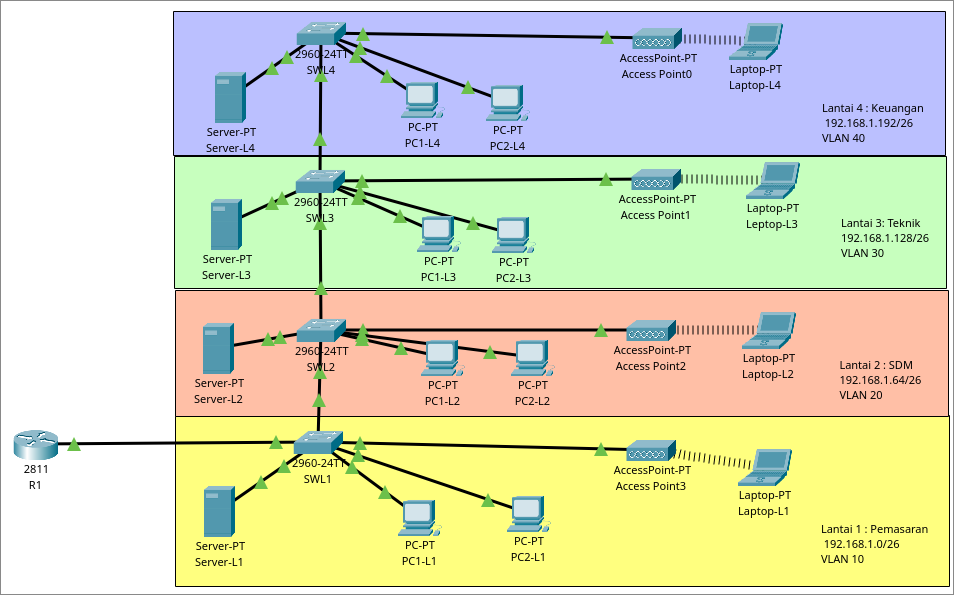
Alokasi Subnet
| Subnet | Network Address | First Host | Last Host | Broadcast |
|---|---|---|---|---|
| Pemasaran (L1) | 192.168.1.0/26 | 192.168.1.1 | 192.168.1.62 | 192.168.1.63 |
| SDM (L2) | 192.168.1.64/26 | 192.168.1.65 | 192.168.1.126 | 192.168.1.127 |
| Teknik (L3) | 192.168.1.128/26 | 192.168.1.129 | 192.168.1.190 | 192.168.1.191 |
| Keuangan (L4) | 192.168.1.192/26 | 192.168.1.193 | 192.168.1.254 | 192.168.1.255 |
Subnet mask: /26 = 255.255.255.192
Keterangan:
- IP usable pertama → Gateway
- IP usable kedua → Server (static)
Konfigurasi
### R1 ```js vlan10 R1(config)#interface f0/0.10 R1(config-subif)#encapsulation dot1Q 10 R1(config-subif)#ip address 192.168.1.1 255.255.255.192 vlan20 R1(config)#interface f0/0.20 R1(config-subif)#encapsulation dot1Q 20 R1(config-subif)#ip address 192.168.1.65 255.255.255.192 vlan30 R1(config)#interface f0/0.30 R1(config-subif)#encapsulation dot1Q 30 R1(config-subif)#ip address 192.168.1.129 255.255.255.192 vlan40 R1(config)#interface f0/0.40 R1(config-subif)#encapsulation dot1Q 40 R1(config-subif)#ip address 192.168.1.193 255.255.255.192 ```
```js dhcp L1 R1(config)#service dhcp R1(config)#ip dhcp pool pemasaran R1(dhcp-config)#network 192.168.1.0 255.255.255.192 R1(dhcp-config)#default-router 192.168.1.1 R1(dhcp-config)#exit R1(config)#ip dhcp excluded-address 192.168.1.1 192.168.1.2 dhcp L2 R1(config)#service dhcp R1(config)#ip dhcp pool SDM R1(dhcp-config)#network 192.168.1.64 255.255.255.192 R1(dhcp-config)#default-router 192.168.1.65 R1(dhcp-config)#exit R1(config)#ip dhcp excluded-address 192.168.1.65 192.168.1.64 dhcp L3 R1(config)#service dhcp R1(config)#ip dhcp pool teknik R1(dhcp-config)#network 192.168.1.128 255.255.255.192 R1(dhcp-config)#default-router 192.168.1.129 R1(dhcp-config)#exit R1(config)#ip dhcp excluded-address 192.168.1.129 192.168.1.130 dhcp L4 R1(config)#service dhcp R1(config)#ip dhcp pool keuangan R1(dhcp-config)#network 192.168.1.192 255.255.255.192 R1(dhcp-config)#default-router 192.168.1.193 R1(dhcp-config)#exit R1(config)#ip dhcp excluded-address 192.168.1.193 192.168.1.194
noshutdown R1(config)#interface f0/0 R1(config)#no shutdown ``` ### SWL1 ```js SWL1(config)#vlan 10 SWL1(config-vlan)#name pemasara SWL1(config-vlan)#vlan 20 SWL1(config-vlan)#name SDM SWL1(config-vlan)#vlan 30 SWL1(config-vlan)#name teknik SWL1(config-vlan)#vlan 40 SWL1(config-vlan)#name keuangan SWL1(config-vlan)#exit SWL1(config)# SWL1(config)#interface range f0/1-10 SWL1(config-if-range)#switchport mode access SWL1(config-if-range)#switchport access vlan 10 SWL1(config-if-range)#exit SWL1(config)# SWL1(config)#interface range g0/1-2 SWL1(config-if-range)#switchport mode trunk ``` ### SWL2 ```js SWL2(config)#vlan 10 SWL2(config-vlan)#name pemasara SWL2(config-vlan)#vlan 20 SWL2(config-vlan)#name SDM SWL2(config-vlan)#vlan 30 SWL2(config-vlan)#name teknik SWL2(config-vlan)#vlan 40 SWL2(config-vlan)#name keuangan SWL2(config-vlan)#exit SWL2(config)# SWL2(config)#interface range f0/1-10 SWL2(config-if-range)#switchport mode access SWL2(config-if-range)#switchport access vlan 20 SWL2(config-if-range)#exit SWL2(config)# SWL2(config)#interface range g0/1-2 SWL2(config-if-range)#switchport mode trunk ``` ### SWL3 ```js SWL3(config)#vlan 10 SWL3(config-vlan)#name pemasara SWL3(config-vlan)#vlan 20 SWL3(config-vlan)#name SDM SWL3(config-vlan)#vlan 30 SWL3(config-vlan)#name teknik SWL3(config-vlan)#vlan 40 SWL3(config-vlan)#name keuangan SWL3(config-vlan)#exit SWL3(config)# SWL3(config)#interface range f0/1-10 SWL3(config-if-range)#switchport mode access SWL3(config-if-range)#switchport access vlan 30 SWL3(config-if-range)#exit SWL3(config)# SWL3(config)#interface range g0/1-2 SWL3(config-if-range)#switchport mode trunk ``` ### SWL4 ```js SWL4(config)#vlan 10 SWL4(config-vlan)#name pemasara SWL4(config-vlan)#vlan 20 SWL4(config-vlan)#name SDM SWL4(config-vlan)#vlan 30 SWL4(config-vlan)#name teknik SWL4(config-vlan)#vlan 40 SWL4(config-vlan)#name keuangan SWL4(config-vlan)#exit SWL4(config)# SWL4(config)#interface range f0/1-10 SWL4(config-if-range)#switchport mode access SWL4(config-if-range)#switchport access vlan 40 SWL4(config-if-range)#exit SWL4(config)# SWL4(config)#interface range g0/1-2 SWL4(config-if-range)#switchport mode trunk ```