This is an old revision of the document!
Cisco : Dynamic Routing - EIGRP
EIGRP adalah singkatan dari Enhanced Interior Gateway Routing Protocol. Ini adalah protokol routing yang dikembangkan oleh Cisco Systems dan digunakan dalam jaringan komputer untuk mengambil keputusan routing dan menyebarkan informasi routing. EIGRP merupakan versi yang ditingkatkan dari Interior Gateway Routing Protocol (IGRP) dan memadukan fitur dari protokol routing vektor jarak dan protokol routing link-state.
EIGRP umum digunakan dalam jaringan perusahaan berukuran menengah hingga besar, terutama yang menggunakan peralatan jaringan Cisco. Namun, penting untuk dicatat bahwa sebagai protokol yang dimiliki secara proporsional oleh Cisco, EIGRP utamanya digunakan dalam lingkungan Cisco dan mungkin tidak dapat berinteroperabilitas dengan perangkat non-Cisco.
Syntax
Konfigurasi OSPF
| Command | Description |
|---|---|
R1(config)#router ospf [PID] | Process ID [PID] (1 - 65535) |
R1(config-router)#router-id [a.b.c.d] | menual mengatur router ID, dengan IPv4 format. |
R1(config-router)#network [network-address] [wildcard-mask] area [area id] | Untuk semua network yang terhubung langsung. Area ID 0 - 4294967295 |
area id dapat ditulis dengan format ip adress
ProTip: Begaimana cara mengetahui network yang terhubung langsung dengan router?
apat diketahu dengan R1(config)#do show ip route con command.
OSPF verification
| Command | Description |
|---|---|
R1#show ip protocols | PID, router ID, advertised networks, neighbors dan administrative distance. |
R1#show ip route | |
R1#show ip ospf neighbor | lis OSPF neighbor |
R1#show ip ospf | identify the PID, router ID, area information, dan waktu |
R1#show ip ospf interface brief | |
R1#show ip ospf interface | list ospf interfaces |
R1#show ip ospf interface [int-id] | Lebih detail |
Contoh:
router ospf 1
 network X.X.X.0 0.0.0.255 area 0
 network Y.Y.Y.0 0.0.0.3 area 0
Topologi
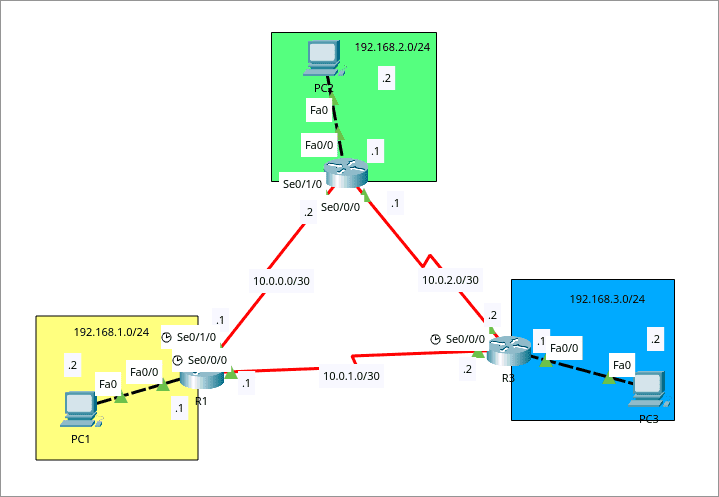
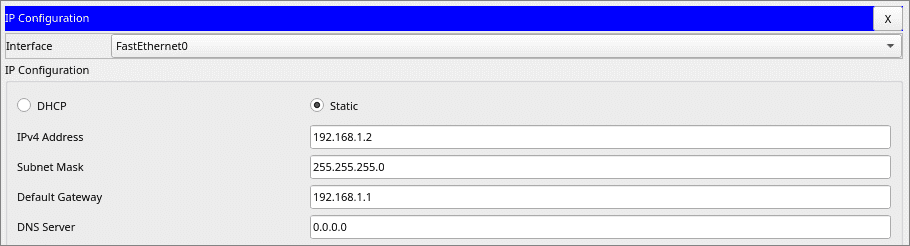
Hubungkan semua segment jaringan hanya dengan ospf dan hanya menggunakan single area
Konfigurasi
- R1 : Tambah static route ke 192.168.13.0/24,192.168.2.0/24
R1(config)#router ospf 1
R1(config-router)#network 192.168.1.0 0.0.0.255 area 0
R1(config-router)#network 10.0.0.0 0.0.0.3 area 0
R1(config-router)#network 10.0.1.0 0.0.0.3 area 0
- R1 : Tambah static route ke 192.168.1.0/24,192.168.2.0/24
R2(config)#router ospf 1
R2(config-router)#network 192.168.2.0 0.0.0.255 area 0
R2(config-router)#network 10.0.0.0 0.0.0.3 area 0
R2(config-router)#network 10.0.2.0 0.0.0.3 area 0
- R3 : Tambah static route ke 192.168.1.0/24,192.168.12.0/24
R3(config)#router ospf 1
R3(config-router)#network 192.168.3.0 0.0.0.255 area 0
R3(config-router)#network 10.0.1.0 0.0.0.3 area 0
R3(config-router)#network 10.0.2.0 0.0.0.3 area 0
Testing
Testing
* Route tables R1
R1#show ip route
Codes: C - connected, S - static, I - IGRP, R - RIP, M - mobile, B - BGP
       D - EIGRP, EX - EIGRP external, O - OSPF, IA - OSPF inter area
       N1 - OSPF NSSA external type 1, N2 - OSPF NSSA external type 2
       E1 - OSPF external type 1, E2 - OSPF external type 2, E - EGP
       i - IS-IS, L1 - IS-IS level-1, L2 - IS-IS level-2, ia - IS-IS inter area
       * - candidate default, U - per-user static route, o - ODR
       P - periodic downloaded static route

Gateway of last resort is not set

     10.0.0.0/30 is subnetted, 3 subnets
C       10.0.0.0 is directly connected, Serial0/1/0
C       10.0.1.0 is directly connected, Serial0/0/0
O       10.0.2.0 [110/128] via 10.0.0.2, 00:02:20, Serial0/1/0
                 [110/128] via 10.0.1.2, 00:02:20, Serial0/0/0
C    192.168.1.0/24 is directly connected, FastEthernet0/0
O    192.168.2.0/24 [110/65] via 10.0.0.2, 00:04:16, Serial0/1/0
O    192.168.3.0/24 [110/65] via 10.0.1.2, 00:02:30, Serial0/0/0
* Route tables R2
R2#show ip route
Codes: C - connected, S - static, I - IGRP, R - RIP, M - mobile, B - BGP
       D - EIGRP, EX - EIGRP external, O - OSPF, IA - OSPF inter area
       N1 - OSPF NSSA external type 1, N2 - OSPF NSSA external type 2
       E1 - OSPF external type 1, E2 - OSPF external type 2, E - EGP
       i - IS-IS, L1 - IS-IS level-1, L2 - IS-IS level-2, ia - IS-IS inter area
       * - candidate default, U - per-user static route, o - ODR
       P - periodic downloaded static route

Gateway of last resort is not set

     10.0.0.0/30 is subnetted, 3 subnets
C       10.0.0.0 is directly connected, Serial0/1/0
O       10.0.1.0 [110/128] via 10.0.0.1, 00:03:12, Serial0/1/0
                 [110/128] via 10.0.2.2, 00:03:12, Serial0/0/0
C       10.0.2.0 is directly connected, Serial0/0/0
O    192.168.1.0/24 [110/65] via 10.0.0.1, 00:05:08, Serial0/1/0
C    192.168.2.0/24 is directly connected, FastEthernet0/0
O    192.168.3.0/24 [110/65] via 10.0.2.2, 00:03:12, Serial0/0/0
* Route tables R3
R3#show ip route
Codes: C - connected, S - static, I - IGRP, R - RIP, M - mobile, B - BGP
       D - EIGRP, EX - EIGRP external, O - OSPF, IA - OSPF inter area
       N1 - OSPF NSSA external type 1, N2 - OSPF NSSA external type 2
       E1 - OSPF external type 1, E2 - OSPF external type 2, E - EGP
       i - IS-IS, L1 - IS-IS level-1, L2 - IS-IS level-2, ia - IS-IS inter area
       * - candidate default, U - per-user static route, o - ODR
       P - periodic downloaded static route

Gateway of last resort is not set

     10.0.0.0/30 is subnetted, 3 subnets
O       10.0.0.0 [110/128] via 10.0.1.1, 00:03:44, Serial0/1/0
                 [110/128] via 10.0.2.1, 00:03:44, Serial0/0/0
C       10.0.1.0 is directly connected, Serial0/1/0
C       10.0.2.0 is directly connected, Serial0/0/0
O    192.168.1.0/24 [110/65] via 10.0.1.1, 00:03:54, Serial0/1/0
O    192.168.2.0/24 [110/65] via 10.0.2.1, 00:03:44, Serial0/0/0
C    192.168.3.0/24 is directly connected, FastEthernet0/0
* Test Ping PC to PC
C:\>ping 192.168.2.2

Pinging 192.168.2.2 with 32 bytes of data:

Reply from 192.168.2.2: bytes=32 time=23ms TTL=126
Reply from 192.168.2.2: bytes=32 time=32ms TTL=126
Reply from 192.168.2.2: bytes=32 time=22ms TTL=126
Reply from 192.168.2.2: bytes=32 time=31ms TTL=126

Ping statistics for 192.168.2.2:
    Packets: Sent = 4, Received = 4, Lost = 0 (0% loss),
Approximate round trip times in milli-seconds:
    Minimum = 22ms, Maximum = 32ms, Average = 27ms

C:\>ping 192.168.3.2

Pinging 192.168.3.2 with 32 bytes of data:

Reply from 192.168.3.2: bytes=32 time=15ms TTL=126
Reply from 192.168.3.2: bytes=32 time=13ms TTL=126
Reply from 192.168.3.2: bytes=32 time=22ms TTL=126
Reply from 192.168.3.2: bytes=32 time=13ms TTL=126

Ping statistics for 192.168.3.2:
    Packets: Sent = 4, Received = 4, Lost = 0 (0% loss),
Approximate round trip times in milli-seconds:
    Minimum = 13ms, Maximum = 22ms, Average = 15ms