Cisco : Dynamic routing - OSPF (single area)
Open Shortest Path First (OSPF) adalah protokol gateway interior (IGP) yang digunakan secara luas untuk melakukan routing paket-paket IP dalam satu sistem otonom (AS) dalam jaringan IP. OSPF dirancang untuk menghitung jalur terpendek secara efisien untuk paket data yang bergerak dari sumber ke tujuan.
Syntax
Konfigurasi OSPF
| Command | Description |
|---|---|
R1(config)#router ospf [PID] | Process ID [PID] (1 - 65535) |
R1(config-router)#router-id [a.b.c.d] | menual mengatur router ID, dengan IPv4 format. |
R1(config-router)#network [network-address] [wildcard-mask] area [area id] | Untuk semua network yang terhubung langsung. Area ID 0 - 4294967295 |
area id dapat ditulis dengan format ip adress
ProTip: Begaimana cara mengetahui network yang terhubung langsung dengan router?
apat diketahu dengan R1(config)#do show ip route con command.
OSPF verification
| Command | Description |
|---|---|
R1#show ip protocols | PID, router ID, advertised networks, neighbors dan administrative distance. |
R1#show ip route | |
R1#show ip ospf neighbor | lis OSPF neighbor |
R1#show ip ospf | identify the PID, router ID, area information, dan waktu |
R1#show ip ospf interface brief | |
R1#show ip ospf interface | list ospf interfaces |
R1#show ip ospf interface [int-id] | Lebih detail |
Contoh:
router ospf 1
 network X.X.X.0 0.0.0.255 area 0
 network Y.Y.Y.0 0.0.0.3 area 0
Topologi
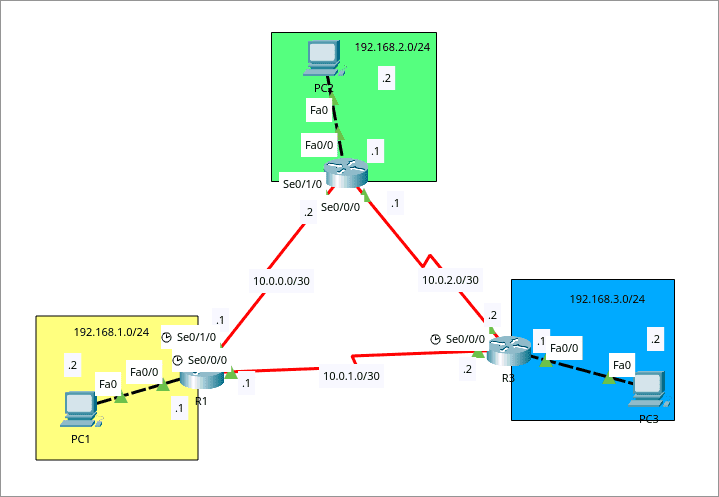
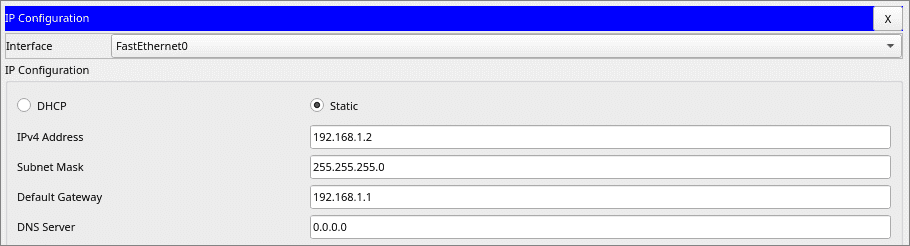
Hubungkan semua segment jaringan hanya dengan ospf dan hanya menggunakan single area
Konfigurasi
- R1 : Konfigurasi OSFP
R1(config)#router ospf 1
R1(config-router)#network 192.168.1.0 0.0.0.255 area 0
R1(config-router)#network 10.0.0.0 0.0.0.3 area 0
R1(config-router)#network 10.0.1.0 0.0.0.3 area 0
- R2 : Konfigurasi OSFP
R2(config)#router ospf 1
R2(config-router)#network 192.168.2.0 0.0.0.255 area 0
R2(config-router)#network 10.0.0.0 0.0.0.3 area 0
R2(config-router)#network 10.0.2.0 0.0.0.3 area 0
- R3 : Konfigurasi OSFP
R3(config)#router ospf 1
R3(config-router)#network 192.168.3.0 0.0.0.255 area 0
R3(config-router)#network 10.0.1.0 0.0.0.3 area 0
R3(config-router)#network 10.0.2.0 0.0.0.3 area 0
Testing
Testing
* Route tables R1
R1#show ip route
Codes: C - connected, S - static, I - IGRP, R - RIP, M - mobile, B - BGP
       D - EIGRP, EX - EIGRP external, O - OSPF, IA - OSPF inter area
       N1 - OSPF NSSA external type 1, N2 - OSPF NSSA external type 2
       E1 - OSPF external type 1, E2 - OSPF external type 2, E - EGP
       i - IS-IS, L1 - IS-IS level-1, L2 - IS-IS level-2, ia - IS-IS inter area
       * - candidate default, U - per-user static route, o - ODR
       P - periodic downloaded static route

Gateway of last resort is not set

     10.0.0.0/30 is subnetted, 3 subnets
C       10.0.0.0 is directly connected, Serial0/1/0
C       10.0.1.0 is directly connected, Serial0/0/0
O       10.0.2.0 [110/128] via 10.0.0.2, 00:02:20, Serial0/1/0
                 [110/128] via 10.0.1.2, 00:02:20, Serial0/0/0
C    192.168.1.0/24 is directly connected, FastEthernet0/0
O    192.168.2.0/24 [110/65] via 10.0.0.2, 00:04:16, Serial0/1/0
O    192.168.3.0/24 [110/65] via 10.0.1.2, 00:02:30, Serial0/0/0
* Route tables R2
R2#show ip route
Codes: C - connected, S - static, I - IGRP, R - RIP, M - mobile, B - BGP
       D - EIGRP, EX - EIGRP external, O - OSPF, IA - OSPF inter area
       N1 - OSPF NSSA external type 1, N2 - OSPF NSSA external type 2
       E1 - OSPF external type 1, E2 - OSPF external type 2, E - EGP
       i - IS-IS, L1 - IS-IS level-1, L2 - IS-IS level-2, ia - IS-IS inter area
       * - candidate default, U - per-user static route, o - ODR
       P - periodic downloaded static route

Gateway of last resort is not set

     10.0.0.0/30 is subnetted, 3 subnets
C       10.0.0.0 is directly connected, Serial0/1/0
O       10.0.1.0 [110/128] via 10.0.0.1, 00:03:12, Serial0/1/0
                 [110/128] via 10.0.2.2, 00:03:12, Serial0/0/0
C       10.0.2.0 is directly connected, Serial0/0/0
O    192.168.1.0/24 [110/65] via 10.0.0.1, 00:05:08, Serial0/1/0
C    192.168.2.0/24 is directly connected, FastEthernet0/0
O    192.168.3.0/24 [110/65] via 10.0.2.2, 00:03:12, Serial0/0/0
* Route tables R3
R3#show ip route
Codes: C - connected, S - static, I - IGRP, R - RIP, M - mobile, B - BGP
       D - EIGRP, EX - EIGRP external, O - OSPF, IA - OSPF inter area
       N1 - OSPF NSSA external type 1, N2 - OSPF NSSA external type 2
       E1 - OSPF external type 1, E2 - OSPF external type 2, E - EGP
       i - IS-IS, L1 - IS-IS level-1, L2 - IS-IS level-2, ia - IS-IS inter area
       * - candidate default, U - per-user static route, o - ODR
       P - periodic downloaded static route

Gateway of last resort is not set

     10.0.0.0/30 is subnetted, 3 subnets
O       10.0.0.0 [110/128] via 10.0.1.1, 00:03:44, Serial0/1/0
                 [110/128] via 10.0.2.1, 00:03:44, Serial0/0/0
C       10.0.1.0 is directly connected, Serial0/1/0
C       10.0.2.0 is directly connected, Serial0/0/0
O    192.168.1.0/24 [110/65] via 10.0.1.1, 00:03:54, Serial0/1/0
O    192.168.2.0/24 [110/65] via 10.0.2.1, 00:03:44, Serial0/0/0
C    192.168.3.0/24 is directly connected, FastEthernet0/0
* Test Ping PC to PC
C:\>ping 192.168.2.2

Pinging 192.168.2.2 with 32 bytes of data:

Reply from 192.168.2.2: bytes=32 time=23ms TTL=126
Reply from 192.168.2.2: bytes=32 time=32ms TTL=126
Reply from 192.168.2.2: bytes=32 time=22ms TTL=126
Reply from 192.168.2.2: bytes=32 time=31ms TTL=126

Ping statistics for 192.168.2.2:
    Packets: Sent = 4, Received = 4, Lost = 0 (0% loss),
Approximate round trip times in milli-seconds:
    Minimum = 22ms, Maximum = 32ms, Average = 27ms

C:\>ping 192.168.3.2

Pinging 192.168.3.2 with 32 bytes of data:

Reply from 192.168.3.2: bytes=32 time=15ms TTL=126
Reply from 192.168.3.2: bytes=32 time=13ms TTL=126
Reply from 192.168.3.2: bytes=32 time=22ms TTL=126
Reply from 192.168.3.2: bytes=32 time=13ms TTL=126

Ping statistics for 192.168.3.2:
    Packets: Sent = 4, Received = 4, Lost = 0 (0% loss),
Approximate round trip times in milli-seconds:
    Minimum = 13ms, Maximum = 22ms, Average = 15ms