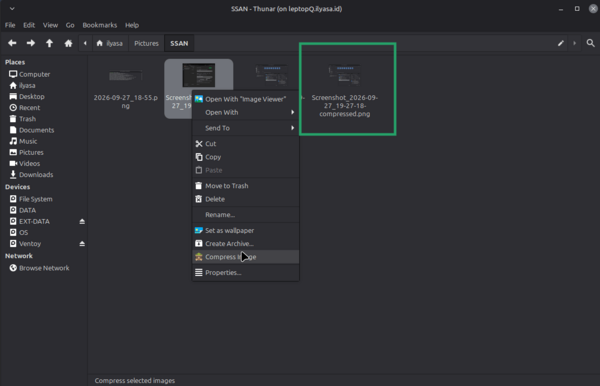
Custom Images Compress untuk filemanager thundar
I HATE TO OPEN ILOVOIMAGES EVERYTIME I NEED TO COMPESS IMAGE, THATS WHY IAM MAKING THIS.
Install Tools Compress
sudo apt install jpegoptim optipng pngquant
Buat Script Compress
mkdir -p ~/.local/bin
nano ~/.local/bin/compress-image.sh
Isi dengan:
#!/bin/bash
#
# compress-image.sh
# Compress JPG/PNG images into new files without modifying the originals.
# Designed to be used with a Thunar Custom Action using selected files (%F).
#
# Requirements: jpegoptim, optipng, pngquant
# Install with:
#   sudo apt install jpegoptim optipng pngquant

set -uo pipefail

JPEG_QUALITY=80
SUFFIX="-compressed"
LOG_TAG="Compress Image"

count_ok=0
count_fail=0
count_skip=0

notify() {
    if command -v notify-send >/dev/null 2>&1; then
        notify-send "$LOG_TAG" "$1"
    fi
}

compress_jpeg() {
    local input="$1"
    local output="$2"

    cp -- "$input" "$output" || return 1

    if jpegoptim --max="$JPEG_QUALITY" --strip-all --quiet "$output"; then
        return 0
    fi

    rm -f -- "$output"
    return 1
}

compress_png() {
    local input="$1"
    local output="$2"
    local ok=true

    cp -- "$input" "$output" || return 1

    optipng -quiet -o5 "$output" || ok=false
    pngquant --force --ext .png --skip-if-larger "$output" 2>/dev/null || true

    if [ "$ok" = true ]; then
        return 0
    fi

    rm -f -- "$output"
    return 1
}

if [ "$#" -eq 0 ]; then
    notify "No files selected."
    exit 1
fi

for file in "$@"; do
    if [ ! -f "$file" ]; then
        echo "Skipped (not a regular file): $file" >&2
        count_skip=$((count_skip + 1))
        continue
    fi

    filename="$(basename -- "$file")"
    directory="$(dirname -- "$file")"

    extension="${filename##*.}"
    name="${filename%.*}"
    ext_lower="$(echo "$extension" | tr '[:upper:]' '[:lower:]')"

    case "$ext_lower" in
        jpg|jpeg|png)
            output="$directory/${name}${SUFFIX}.${extension}"

            # Avoid overwriting an existing compressed file.
            if [ -e "$output" ]; then
                echo "Skipped (output already exists): $output" >&2
                count_skip=$((count_skip + 1))
                continue
            fi

            if [ "$ext_lower" = "jpg" ] || [ "$ext_lower" = "jpeg" ]; then
                if compress_jpeg "$file" "$output"; then
                    count_ok=$((count_ok + 1))
                    echo "Compressed: $file -> $output"
                else
                    count_fail=$((count_fail + 1))
                fi
            else
                if compress_png "$file" "$output"; then
                    count_ok=$((count_ok + 1))
                    echo "Compressed: $file -> $output"
                else
                    count_fail=$((count_fail + 1))
                fi
            fi
            ;;
        *)
            echo "Skipped (unsupported format): $file" >&2
            count_skip=$((count_skip + 1))
            ;;
    esac
done

summary="Success: $count_ok, Failed: $count_fail, Skipped: $count_skip"
echo "$summary"
notify "$summary"
Kasih permission execute:
chmod +x ~/.local/bin/compress-image.sh
Tambah Custom Action di Thunar
Buka Thunar, lalu:
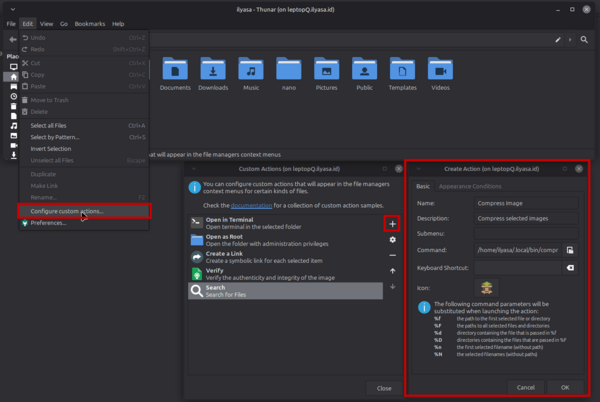
Edit → Configure custom actions… Klik tombol + (Add)
Di tab Basic:
- Name: Compress Image
- Description: Compress selected images
- Command: /home/USERNAME/.local/bin/compress-image.sh %F (ganti USERNAME sesuai user kamu)
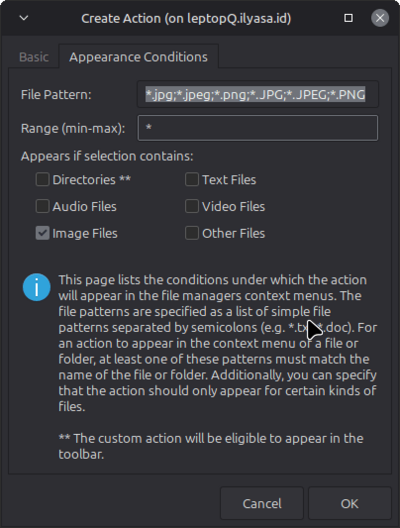
Di tab Appearance Conditions:
- File Pattern: *.jpg;*.jpeg;*.png;*.JPG;*.JPEG;*.PNG
- Centang Image Files
Hasil