Table of Contents
Cisco : Dynamic Routing - OSPF (multi area)
Pada halaman OSPF sebelumnya Cisco : Dynamic routing - OSPF (single area) kita hanya menkonfigurasi topologi ospf single area. sekarang kita akan konfigurasi topology dengan ospf multi area. Kenapa? Dengan Multi Area OSPF Jaringan dibagi menjadi beberapa area, dengan satu area backbone (area 0) yang menghubungkan semua area lainnya. Ini bertujuan dalam meningkatkan
- Skalabilitas: Memungkinkan pembagian jaringan besar menjadi segmen-segmen yang lebih kecil, sehingga mengurangi beban pada router dan LSDB.
- Pengurangan Overhead: Mengurangi jumlah rute yang perlu disimpan dan diproses oleh setiap router, karena informasi routing terbatas pada area masing-masing.
- Keamanan dan Kontrol: Memungkinkan lebih banyak kontrol dan segmentasi, serta dapat meningkatkan keamanan dengan membatasi penyebaran informasi routing.
Syntax
Konfigurasi OSPF
| Command | Description |
|---|---|
R1(config)#router ospf [PID] | Process ID [PID] (1 - 65535) |
R1(config-router)#router-id [a.b.c.d] | menual mengatur router ID, dengan IPv4 format. |
R1(config-router)#network [network-address] [wildcard-mask] area [area id] | Untuk semua network yang terhubung langsung. Area ID 0 - 4294967295 |
area id dapat ditulis dengan format ip adress
ProTip: Begaimana cara mengetahui network yang terhubung langsung dengan router?
apat diketahu dengan R1(config)#do show ip route con command.
OSPF verification
| Command | Description |
|---|---|
R1#show ip protocols | PID, router ID, advertised networks, neighbors dan administrative distance. |
R1#show ip route | |
R1#show ip ospf neighbor | lis OSPF neighbor |
R1#show ip ospf | identify the PID, router ID, area information, dan waktu |
R1#show ip ospf interface brief | |
R1#show ip ospf interface | list ospf interfaces |
R1#show ip ospf interface [int-id] | Lebih detail |
Contoh:
router ospf 1
 network X.X.X.0 0.0.0.255 area 0
 network Y.Y.Y.0 0.0.0.3 area 1
Topologi
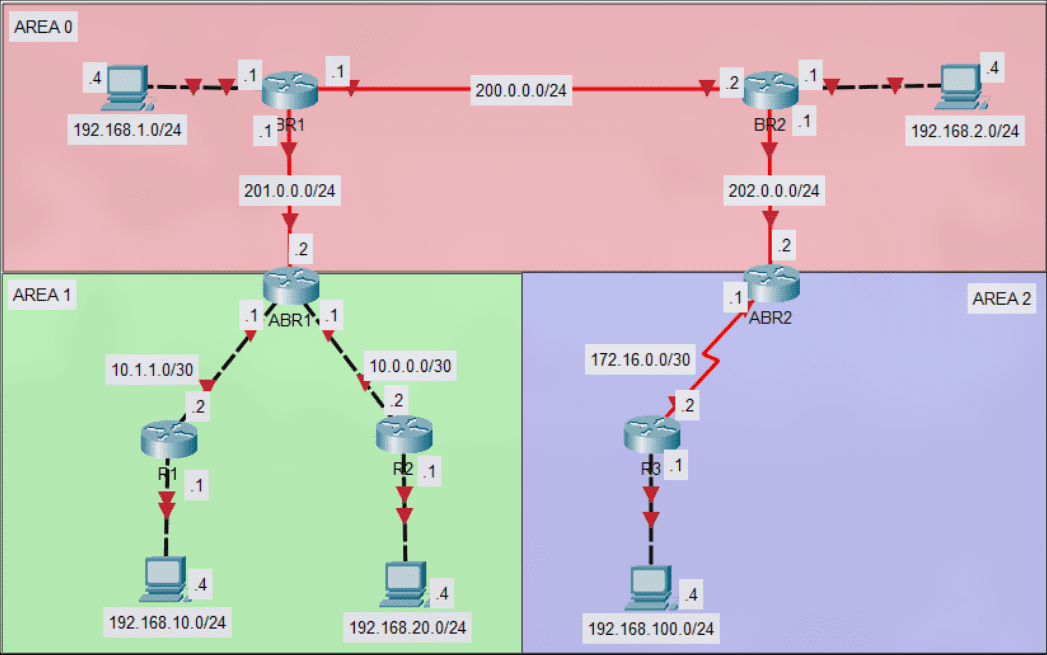
Konfigurasi
- BR1 : Konfigurasi OSPF
BR1(config)#router ospf 1
BR1(config-router)#network 192.168.1.0 0.0.0.255 area 0
BR1(config-router)#network 200.0.0.0 0.0.0.255 area 0
BR1(config-router)#network 201.0.0.0 0.0.0.255 area 0
- BR2 : Konfigurasi OSPF
BR2(config)#router ospf 1
BR2(config-router)#network 192.168.2.0 0.0.0.255 area 0
BR2(config-router)#network 200.0.0.0 0.0.0.255 area 0
BR2(config-router)#network 202.0.0.0 0.0.0.255 area 0
- ABR1 : Konfigurasi OSPF
ABR1(config)#router ospf 1
ABR1(config-router)#network 201.0.0.0 0.0.0.255 area 0
ABR1(config-router)#network 10.0.0.0 0.0.0.3 area 1
ABR1(config-router)#network 10.1.1.0 0.0.0.3 area 1
- ABR2 : Konfigurasi OSPF
ABR2(config)#router ospf 1
ABR2(config-router)#network 202.0.0.0 0.0.0.255 area 0
ABR2(config-router)#network 172.16.0.0 0.0.0.3 area 2
- R1 : Konfigurasi OSPF
R1(config)#router ospf 1
R1(config-router)#network 192.168.10.0 0.0.0.255 area 1
R1(config-router)#network 10.1.1.0 0.0.0.3 area 1
- R2 : Konfigurasi OSPF
R2(config)#router ospf 1
R2(config-router)#network 192.168.20.0 0.0.0.255 area 1
R2(config-router)#network 10.0.0.0 0.0.0.3 area 1
- R3 : Konfigurasi OSPF
R3(config)#router ospf 1
R3(config-router)#network 192.168.100.0 0.0.0.255 area 2
R3(config-router)#network 172.16.0.0 0.0.0.3 area 2