Cisco : Dynamic Routing - RIPv2
Cisco RIP (Routing Information Protocol): Adalah salah satu protokol dynamic routing yang paling sederhana dan sering digunakan. RIP menggunakan algoritma distance vector untuk menghitung jarak menuju suatu jaringan, yang diukur berdasarkan jumlah hop (lompatan) yang harus dilalui oleh paket data.
Syntax
RIPv1 configuration
| Command | Description |
|---|---|
R1(config)#router rip | masuk ke mode routing dengan rip sebagai |
R1(config-router)#network [network-id] | Menspesifikasikan network address. tanpa subnetmask/wildcard |
R1(config-router)#passive-interface [int-id] | (optional) - mencegah interface meniklankan rip routing update |
Untuk alasan keamanan, interface yang TIDAK perlu mengirim update RIP (misalnya, interface yang menghadapi segmen jaringan dengan host dan bukan router lain) harus dikonfigurasi sebagai pasif. Ini merupakan praktik yang baik karena pembaruan RIP pada segmen ini hanya akan membuang-buang bandwidth.
Seperti yang Anda lihat, TIDAK ADA informasi subnet mask yang dikonfigurasi. Saat meneruskan update, router menggunakan mask yang dikonfigurasi pada antarmuka lokal atau mask default berdasarkan kelas alamat (A, B, atau C).
Karena itu, jaringan Anda pada skema RIPv1 ** HARUS KONSISTEN**, yang berarti bahwa VLSM atau supernetting tidak didukung oleh RIP versi 1
RIPv2 configuration
| Command | Description |
|---|---|
R1(config)#router rip | masuk ke mode routing dengan rip sebagai |
R1(config-router)#version 2 | Mengubah versi RIPv1 mennjadi RIPv2 |
R1(config-router)#no auto-summary | disable network auto summarization |
Topologi
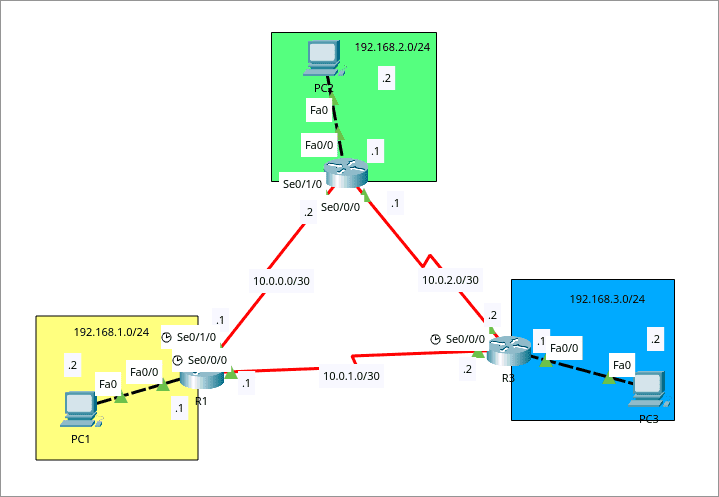
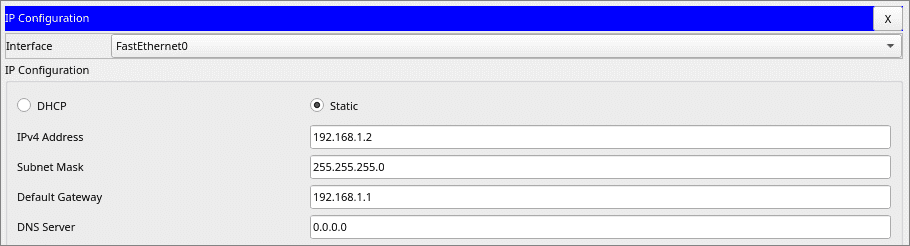
Hubungkan semua segment jaringan dengan rip
Konfigurasi
- R1 : Konfigurasi Routing RIP
R1(config)#router rip
R1(config-router)#version 2
R1(config-router)#no auto-summary
R1(config-router)#network 192.168.1.0
R1(config-router)#network 10.0.0.0
R1(config-router)#network 10.0.1.0
R1(config-router)#passive-interface f0/0
- R2 : Konfigurasi Routing RIP
R2(config)#router rip
R2(config-router)#version 2
R2(config-router)#no auto-summary
R2(config-router)#network 192.168.2.0
R2(config-router)#network 10.0.0.0
R2(config-router)#network 10.0.2.0
R2(config-router)#passive-interface f0/0
- R3 : Konfigurasi Routing RIP
R3(config)#router rip
R3(config-router)#version 2
R3(config-router)#no auto-summary
R3(config-router)#network 192.168.3.0
R3(config-router)#network 10.0.2.0
R3(config-router)#network 10.0.1.0
R3(config-router)#passive-interface f0/0
Testing
* Table Routing R1
R1#show ip route
Codes: C - connected, S - static, I - IGRP, R - RIP, M - mobile, B - BGP
       D - EIGRP, EX - EIGRP external, O - OSPF, IA - OSPF inter area
       N1 - OSPF NSSA external type 1, N2 - OSPF NSSA external type 2
       E1 - OSPF external type 1, E2 - OSPF external type 2, E - EGP
       i - IS-IS, L1 - IS-IS level-1, L2 - IS-IS level-2, ia - IS-IS inter area
       * - candidate default, U - per-user static route, o - ODR
       P - periodic downloaded static route

Gateway of last resort is not set

     10.0.0.0/30 is subnetted, 3 subnets
C       10.0.0.0 is directly connected, Serial0/1/0
C       10.0.1.0 is directly connected, Serial0/0/0
R       10.0.2.0 [120/1] via 10.0.0.2, 00:00:26, Serial0/1/0
                 [120/1] via 10.0.1.2, 00:00:21, Serial0/0/0
C    192.168.1.0/24 is directly connected, FastEthernet0/0
R    192.168.2.0/24 [120/1] via 10.0.0.2, 00:00:26, Serial0/1/0
R    192.168.3.0/24 [120/1] via 10.0.1.2, 00:00:21, Serial0/0/0
* Table Routing R2
R2#show ip route
Codes: C - connected, S - static, I - IGRP, R - RIP, M - mobile, B - BGP
       D - EIGRP, EX - EIGRP external, O - OSPF, IA - OSPF inter area
       N1 - OSPF NSSA external type 1, N2 - OSPF NSSA external type 2
       E1 - OSPF external type 1, E2 - OSPF external type 2, E - EGP
       i - IS-IS, L1 - IS-IS level-1, L2 - IS-IS level-2, ia - IS-IS inter area
       * - candidate default, U - per-user static route, o - ODR
       P - periodic downloaded static route

Gateway of last resort is not set

     10.0.0.0/30 is subnetted, 3 subnets
C       10.0.0.0 is directly connected, Serial0/1/0
R       10.0.1.0 [120/1] via 10.0.0.1, 00:00:13, Serial0/1/0
                 [120/1] via 10.0.2.2, 00:00:22, Serial0/0/0
C       10.0.2.0 is directly connected, Serial0/0/0
R    192.168.1.0/24 [120/1] via 10.0.0.1, 00:00:13, Serial0/1/0
C    192.168.2.0/24 is directly connected, FastEthernet0/0
R    192.168.3.0/24 [120/1] via 10.0.2.2, 00:00:22, Serial0/0/0
* Table Routing R3
R3#show ip route
Codes: C - connected, S - static, I - IGRP, R - RIP, M - mobile, B - BGP
       D - EIGRP, EX - EIGRP external, O - OSPF, IA - OSPF inter area
       N1 - OSPF NSSA external type 1, N2 - OSPF NSSA external type 2
       E1 - OSPF external type 1, E2 - OSPF external type 2, E - EGP
       i - IS-IS, L1 - IS-IS level-1, L2 - IS-IS level-2, ia - IS-IS inter area
       * - candidate default, U - per-user static route, o - ODR
       P - periodic downloaded static route

Gateway of last resort is not set

     10.0.0.0/30 is subnetted, 3 subnets
R       10.0.0.0 [120/1] via 10.0.1.1, 00:00:16, Serial0/1/0
                 [120/1] via 10.0.2.1, 00:00:03, Serial0/0/0
C       10.0.1.0 is directly connected, Serial0/1/0
C       10.0.2.0 is directly connected, Serial0/0/0
R    192.168.1.0/24 [120/1] via 10.0.1.1, 00:00:16, Serial0/1/0
R    192.168.2.0/24 [120/1] via 10.0.2.1, 00:00:03, Serial0/0/0
C    192.168.3.0/24 is directly connected, FastEthernet0/0
* Test Ping
C:\>ping 192.168.2.2

Pinging 192.168.2.2 with 32 bytes of data:

Request timed out.
Reply from 192.168.2.2: bytes=32 time=16ms TTL=126
Reply from 192.168.2.2: bytes=32 time=23ms TTL=126
Reply from 192.168.2.2: bytes=32 time=11ms TTL=126

Ping statistics for 192.168.2.2:
    Packets: Sent = 4, Received = 3, Lost = 1 (25% loss),
Approximate round trip times in milli-seconds:
    Minimum = 11ms, Maximum = 23ms, Average = 16ms

C:\>ping 192.168.3.2

Pinging 192.168.3.2 with 32 bytes of data:

Request timed out.
Reply from 192.168.3.2: bytes=32 time=22ms TTL=126
Reply from 192.168.3.2: bytes=32 time=15ms TTL=126
Reply from 192.168.3.2: bytes=32 time=22ms TTL=126

Ping statistics for 192.168.3.2:
    Packets: Sent = 4, Received = 3, Lost = 1 (25% loss),
Approximate round trip times in milli-seconds:
    Minimum = 15ms, Maximum = 22ms, Average = 19ms